Best Practices: Security Log Management & Compliance Webinar
Wednesday, July 28 at 10am ET
Ready to learn how to secure and protect your infrastructure, reduce cyber threats, and comply with corporate and regulatory policy? Then don’t miss this hands-on session on the Do’s and Don’ts of Log Management!
One lucky attendee from the webinar will be picked to receive a free Amazon Kindle!
View the recording
As an IT professional, government contractor or compliance officer, you are responsible
for keeping your business applications and infrastructure up and running as well
as ensuring that they are secure and protected. Your senior management depends on
you to take the necessary steps to meet and report on regulatory compliance standards
like:
While you know that vital information relating to network security is available
in your log files right now, dealing with the volume of data constantly being generated
from across your infrastructure is impossible without the right tools.
Introducing the WhatsUp Event Log Management Suite
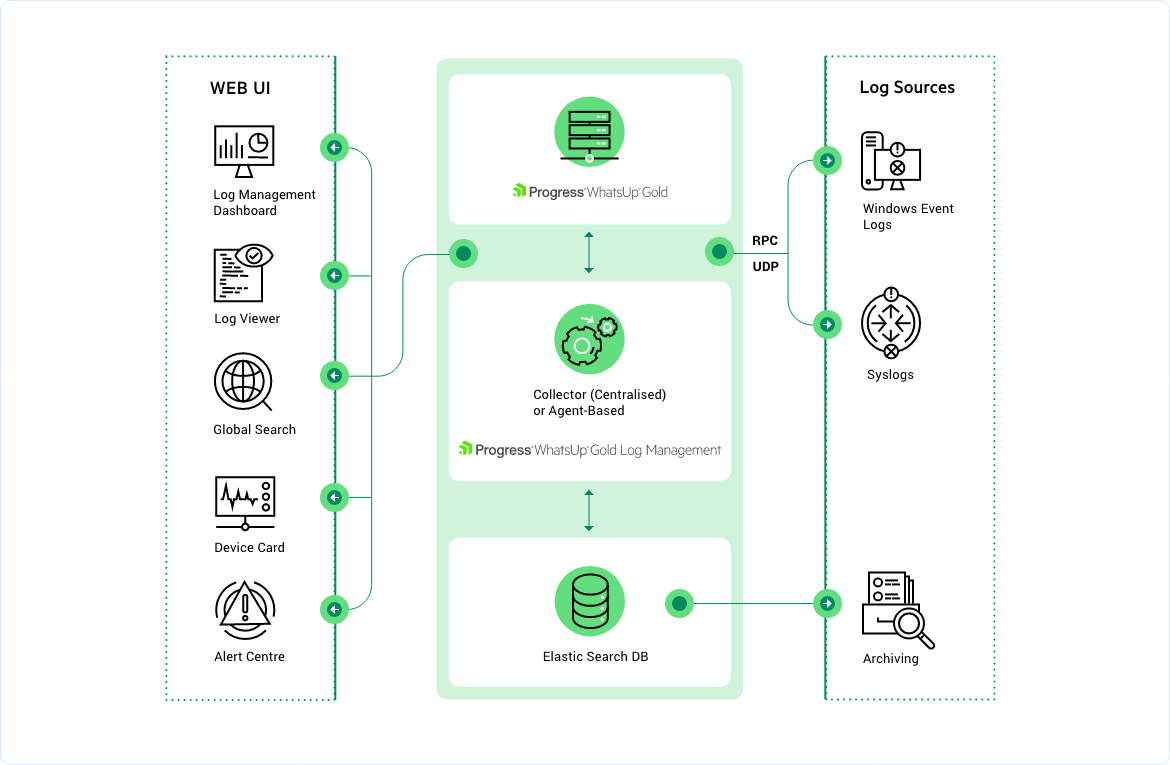
The WhatsUp Event Log Management Suite is a modular set of applications that can
automatically collect, store, analyze and report on both Windows Event and Syslog
files for near real-time security event detection and response as well as historical
compliance assurance and forensics. Depending on your environment and the specific
challenges you are facing – you can select individual products that independently
provide pinpoint solutions or opt for the comprehensive suite that gives you everything
that you need.
With the WhatsUp Event Log Management Suite you can:
- Collect Windows Event log (from Windows systems and hosted applications) and Syslog
information (from routers, switches, firewalls, IDS, IPS and Unix and Linux servers)
for comprehensive analysis and audit
- Access custom reports for IT personnel, compliance officers and
even law enforcement agencies
- Monitor network security threats in real-time and facilitate appropriate incident
response
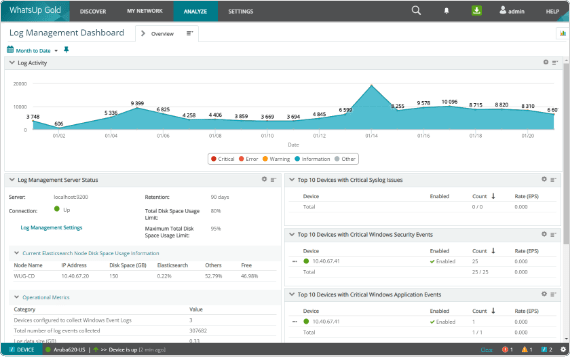
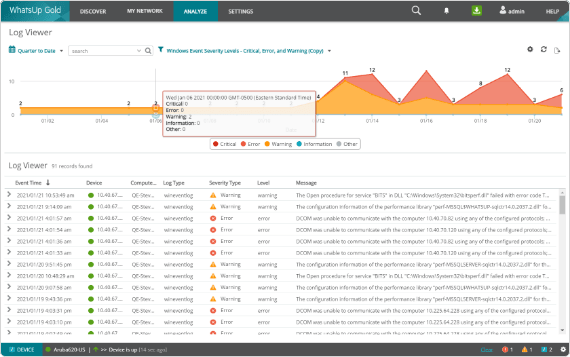
- Provide on-the-fly access to event log data for routine viewing or operational triage
- Analyze, filter and report on network security and regulatory compliance goals
- Automate the warehousing and cleansing of log data over time as per regulatory requirements
- Manage end-to-end IT operations in conjunction with WhatsUp Gold and related plug-ins
Product Demonstrations
In order to view these you need to have Flash installed. Click here to download the free Flash player.
Component Products in WhatsUp Event Log Management Suite:
The WhatsUp Event Log Management Suite comprises of four individual products that
can work independently or together as an integrated set of tools.
Log files generated by different operating systems, applications, routers, switches
and other Syslog devices can vary in format and message content and easily grow
to large sizes. This is true for Windows based systems too – and collection,
normalization, archival and management of log data from its different versions has
its challenges. WhatsUp Event Archiver does exactly that - automating the process
of collecting and storing Windows Event logs and Syslog files, as well as providing
the means for data cleansing and management over time.
Potential security events can arise from both inside or outside the network perimeter.
Monitoring and identifying patterns of activities from volumes of log data in near
real-time needs powerful alert rule configuration and analysis capabilities. WhatsUp
Event Alarm continuously monitors collected log data across the Windows Event log
and Syslog domains, helps identify potential threat incidents and notifies operations
teams via actionable alerts.
Log reporting is crucial to set a baseline for network security metrics and compliance
achievement across all stakeholders. Yet, with the volume of logs generated, any
attempt at manual analysis and reporting is bound to fail. WhatsUp Gold Event Analyst
enables automated filtering, reporting and translation of archived raw log data
into actionable intelligence.
Operations teams need to routinely view event log data and when needed, perform
forensic analysis to support emergency response to network health and security threats.
In either case, sifting through Syslog files to troubleshoot a problem or sorting
and viewing chronologically displayed log files in an interface like the Windows
Event Viewer is cumbersome and time consuming. WhatsUp Event Rover supports efficient,
on-the-fly reviewing and forensic analysis of high volume log data for data mining
and routine analysis.
Comprehensive log management for network security event response, compliance audit, investigation and reporting
Every network is different, and the regulatory requirements and internal standards with which security professionals and their networks must comply are wide-ranging. As a network security professional you may choose to be focused on threat management and the need to monitor ongoing events in near real-time (formally called Security Event management or SEM). Or, you may be required to collect and store log files for compliance audit, forensic analysis, breach investigation assistance and reporting (formally called Security Information Management of SIM). Or quite likely, your network and organization policies may require you to do both (together called SIEM).
Whichever be the case, your log management solution needs to flexible, scalable and modular – so that you can easily calibrate what features you need to start with, and expand into other areas as your requirements change. And do this without breaking your budget and resource requirements – which is typically the case for “platform” type tools which require heavy lifting for configuration and customization from the get go.
Comprehensive, Modular and Easy to Use Event Log Management
With the acquisition of Dorian Software Creations Inc, WhatUp Gold now offers a complete set of modular, flexible and scalable event and log monitoring, collection, storage and reporting tools that can help you start and grow your chosen log management strategies. Just like other WhatsUp Gold software, these tools are highly cost-effective, intuitive and easy to use and available for a 30 day free trial so you can be sure of what you are getting in return for your money. And with more than a decade of experience and customer focused development behind it across thousands of real networks, WhatsUp Event Log Management may be the solution you were waiting for.
The WhatsUp Event Log Management suite offers the following key capabilities:
A Wide Selection of Tools to Suit your Need and Your Budget
Event logs are useful in multiple ways – they can help detect and stop malware and other security threats from penetrating your network; provide visibility into event patterns that shape the security policies for your organization; or collect and store log data for critical compliance audit and reporting. Whatever the need, WhatsUp Event Log Management offers the right tools that can work independently or as part of a total event log management solution. These include Event Archiver, Event Alarm, Event Analyst and Event Rover.
Many security and event log management solutions work with one type of log format and not as well with the other. WhatsUp Event Log Management’s log management capability extends to cover both Windows Event logs (generated by Windows hosts and applications) and Syslog messages (generated by Unix and Linux hosts and typical network devices like routers, switches and firewalls). For example, WhatsUp Event Alarm can monitor both Windows Events and Syslog messages in real-time and inform operators if it detects a network security event of interest.
Dual Agentless and Hosted Agent Architecture Support
Hosted agent architectures are costlier to acquire, deploy and manage. Yet, sometimes that is the only option available – especially when network policies restrict remote log management across the subnets or the WAN. Unlike log management solutions that necessarily require hosted agents, WhatsUp WhatsUp Event Log Management supports both agentless and agent-based architectures in the same deployment for maximum flexibility and cost-effectiveness.
Standard Database Support
Using a proprietary database is one of the chief causes of vendor ‘lock-in’. Having historical compliance data sitting in a proprietary database can make it impossible to transition to a new software solution without the costs of parallel licenses, monitoring and storage. WhatsUp Event Log Management solutions support standard databases like MS Access, MS SQL and Oracle to meet the requirements of small to large organizations. This also ensures that the organization has easy access to requisite skills for database maintenance. In fact, WhatsUp Event Log Management applications inherently support some routine maintenance tasks like database purging and clearing – giving a head start to network personnel in charge of managing large event log archives.
Coverage across Multiple Types of Event Logs
As any network administrator knows - threats come in many forms. Yet, many log management tools rely or have relied on the Microsoft definition of a "security" event - specifically, one that occurs in the Security Log of a Windows NT or XP system for instance. However, compliance with many of today's regulations and best security practices require a comprehensive view of network health and security, and data of interest isn't found in the Security Log alone. WhatsUp Event Log Management solutions monitor and collect from comprehensive log sources including security, administrative, operational and application logs as needed across both EVT (for Windows NT, 2003, XP) and EVTX (for Windows Vista, 2008 and later) log formats.
Learn more about WhatsUp Event Log Management’s exclusive and patented LogRefiner™ technology.