
Mapa de topología de red
Progress® WhatsUp® Gold allows you to automatically create interactive network topology maps using Layer 2 and Layer 3 detection methods.
Visualizar redes complejas
Las redes actuales son grandes, dinámicas y forman la columna vertebral de la continuidad del negocio. Mantener un rendimiento óptimo y el estado de la red, así como para una mejor solución de problemas operativos con el fin de garantizar la continuidad del negocio, una visión completa de la red es esencial, y un mapa de topología de red puede proporcionar esto.
Comprender las interdependencias
Al visualizar los dispositivos de la red, sus interconexiones, ubicación e interdependencias, los administradores pueden supervisar los dispositivos de red, identificar proactivamente los errores/cuellos de botella y reducir el MTTR, lo que garantiza una mejor recuperación ante desastres/negocio Continuidad. Además, un mapa de topología detallado es ahora esencial para las regulaciones de cumplimiento como PCI-DSS.
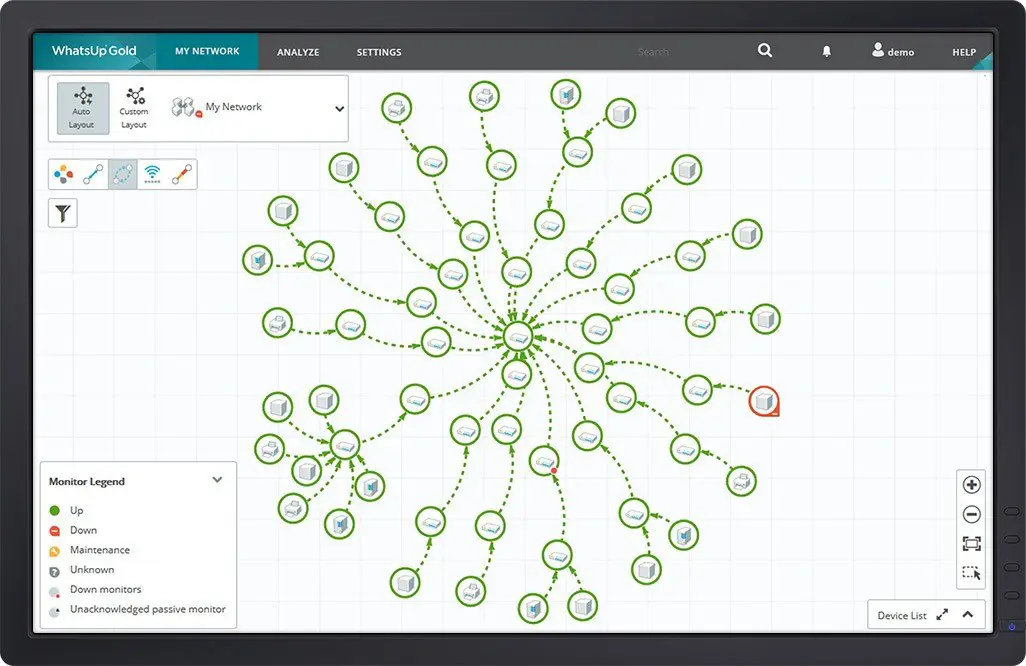 Mapa de dependencia de dispositivos WhatsUp Gold
Mapas de topología de red WhatsUp Gold
La herramienta de descubrimiento y mapeo de WhatsUp Gold utiliza métodos de detección de Capa 2 y Capa 3 para crear mapas de topología de red completos que muestran todos los elementos de red, incluidos enrutadores, conmutadores, VLAN, servidores físicos y virtuales y estaciones de trabajo. La herramienta viene con un alto grado de personalización, y cualquier aspecto de la topología y los enlaces individuales se pueden ocultar / mostrar.
Las características integradas incluyen arrastrar y soltar funcionalmente; visualización de la correlación dispositivo-monitor que se muestra en el mapa; mostrar los detalles del dispositivo, como los atributos y el estado junto al icono del dispositivo; y una selección de vistas radiales/jerárquicas/personalizadas. Al correlacionar El direccionamiento de la capa 3 a los mapas de la capa 2, WhatsUp Gold proporciona un mapa de topología completo, integrado de la capa 2/3 que muestra el IP y la Conectividad de nivel de interfaz.
Automated discovery removes the guesswork and manual labor traditionally required to map complex networks, saving time and reducing human error. IT teams benefit from instant, accurate visibility into every connected device and how they interact, empowering faster onboarding, easier audits, and streamlined change management. This level of automation increases operational efficiency and frees up resources for more strategic initiatives.
Real-time monitoring gives IT teams the ability to stay ahead of issues before they become service-impacting problems. With instant visibility into device performance and status, teams can proactively respond to bottlenecks, outages, or irregular traffic. This reduces downtime and MTTR and maintains a more reliable user experience, reinforcing trust in IT services and reducing business disruptions.

Seamless integration with other network tools creates a more unified and efficient IT ecosystem. Teams gain a holistic view of the network, combining topology data with performance metrics, alerts, and logs in one place. This reduces silos, accelerates troubleshooting, and enhances overall decision-making. It ultimately lead to better service delivery and more strategic IT operations.
Key Benefits of WhatsUp Gold’s Network Topology Mapper:
2/3 Discovery
WhatsUp Gold’s automated network topology mapper utilizes a combination of discovery methods, including SNMP, ARP, ICMP, SSH, LLDP, and vendor-specific protocols, to identify all connected devices and their interconnections. This approach helps to maintain a comprehensive and accurate representation of the network's physical and logical topology.

You can automatically generate topology maps that update in real-time as the network evolves. This dynamic network mapping capability allows administrators to visualize current network configurations and quickly identify changes or issues.
Identify and map dependencies between devices, enabling the suppression of redundant alerts. For example, if a core switch fails, the system recognizes that downstream devices are affected due to this failure, helping to prevent multiple unnecessary alerts and aiding in faster root cause analysis.
WhatsUp Gold network mapping software offers the ability to tailor network maps with custom images, annotations, and organizational layouts. Administrators can create views that align with specific monitoring needs or organizational structures, enhancing clarity and usability.
Frequently Asked Questions
What is a network topology?
A network topology refers to the arrangement of devices and how they connect and communicate within a network. Understanding your network topology is crucial for managing performance, planning capacity, and troubleshooting issues efficiently.
How does a network topology mapping software work?
Network topology mapping software automatically discovers connected devices and visualizes how they’re linked, using protocols like SNMP, ARP, and LLDP. It creates interactive maps that reflect both physical and logical layouts, updating dynamically as your network changes.
How does a network topology map help in troubleshooting?
Topology maps provide real-time visibility into device status and interdependencies, helping teams quickly pinpoint the root cause of network issues. Instead of reacting to multiple alerts, admins can trace the problem to a single failed connection or device and reduce Mean Time to Repair (MTTR).
What’s the difference between Layer 2 and Layer 3 network topology mapping?
Layer 2 mapping shows the physical connections between devices—like switches, access points, and VLANs, while Layer 3 focuses on logical IP-level connections such as routing paths. Combining both gives a complete view of how data flows across the network.
How do businesses use network topology mappers for compliance?
Businesses use topology maps to document their infrastructure for audits, track device inventory, and demonstrate security controls. For regulations like PCI-DSS or HIPAA, this level of visibility maintains network segmentation and access controls are properly implemented and maintained.
Monitoriza todo en tu red
Comienza tu prueba gratuita de of WhatsUp Gold.