
You log into your network monitoring dashboard and see the alert: “High bandwidth usage detected.” This is not just a routine message; it’s a sign that something is putting pressure on your network. Bandwidth is the backbone of modern connectivity, and when usage spikes unexpectedly, the consequences can be severe. Applications slow down, cloud costs rise, and in some cases, spikes may point to a security threat.
In this article, we’ll explain why high bandwidth usage matters, explore common causes, show how monitoring tools detect it and outline practical steps to diagnose and resolve the issue.
Why Excessive Bandwidth Usage is Problematic
Bandwidth is the highest amount of data that can be transferred across your network within a specific period. When usage exceeds normal levels, performance decreases. Business-critical applications such as VoIP, ERP, CRM platforms, video conferencing tools and cloud collaboration suites can become sluggish. Costs can also climb because many cloud providers charge based on data transfer. Unusual traffic patterns could indicate malicious activity such as malware or data theft.
If you’re uncertain about your current capacity, check your bandwidth speed to establish a baseline. This helps you understand what “normal” looks like in your environment and gives you a starting point for troubleshooting.
Excessive bandwidth usage doesn’t just slow things down. It can disrupt workflows, delay critical processes and cause frustration for end users. In industries where uptime and responsiveness are critical, such as healthcare or finance, these delays can have real-world consequences. That’s why it’s crucial to address bandwidth issues quickly and before they become a recurring problem.
Common Causes of High Bandwidth Usage
To understand what causes bandwidth spikes, the first step is to identify and address the underlying cause, which usually falls into two categories.
Legitimate Causes
Large backups or software updates typically require massive data transfers. These processes are important, but they can overwhelm your network if running during peak hours. Remote work also adds pressure as video calls and virtual meetings consume significant bandwidth. Streaming during presentations or training sessions can also contribute. Continuous synchronization between data centers or cloud platforms is another factor. Replication jobs run quietly in the background, but the bandwidth they consume adds up quickly.
Another legitimate cause is the use of cloud-based applications. As organizations shift more workloads to the cloud, data transfer between on-premises systems and cloud platforms becomes constant. This is normal, but without proper planning, it can cause congestion.
Malicious or Unauthorized Causes
Not all bandwidth spikes are harmless. Malware infections or botnet activity can flood your network with outbound traffic. Shadow IT, where employees use unauthorized apps or services, often creates unexpected drains. In the worst cases, attackers may launch Direct Denial of Service (DDoS) attacks or attempt data exfiltration, overwhelming your network or stealing sensitive information. These scenarios require immediate attention because they can compromise security and disrupt operations.
Unauthorized streaming or file sharing can also be a factor. Employees using personal devices or applications for non-work purposes can consume significant bandwidth without realizing the impact on business-critical systems.
How Network Monitoring Tools Detect High Bandwidth Usage
Modern monitoring tools like WhatsUp Gold use several techniques to spot abnormal usage:
- Deep packet, NetFlow and SNMP inspection for traffic analysis
- Threshold-based and anomaly detection to flag unusual patterns
- Real-time alerts versus scheduled reports for proactive response
- Historical trend analysis to identify recurring issues
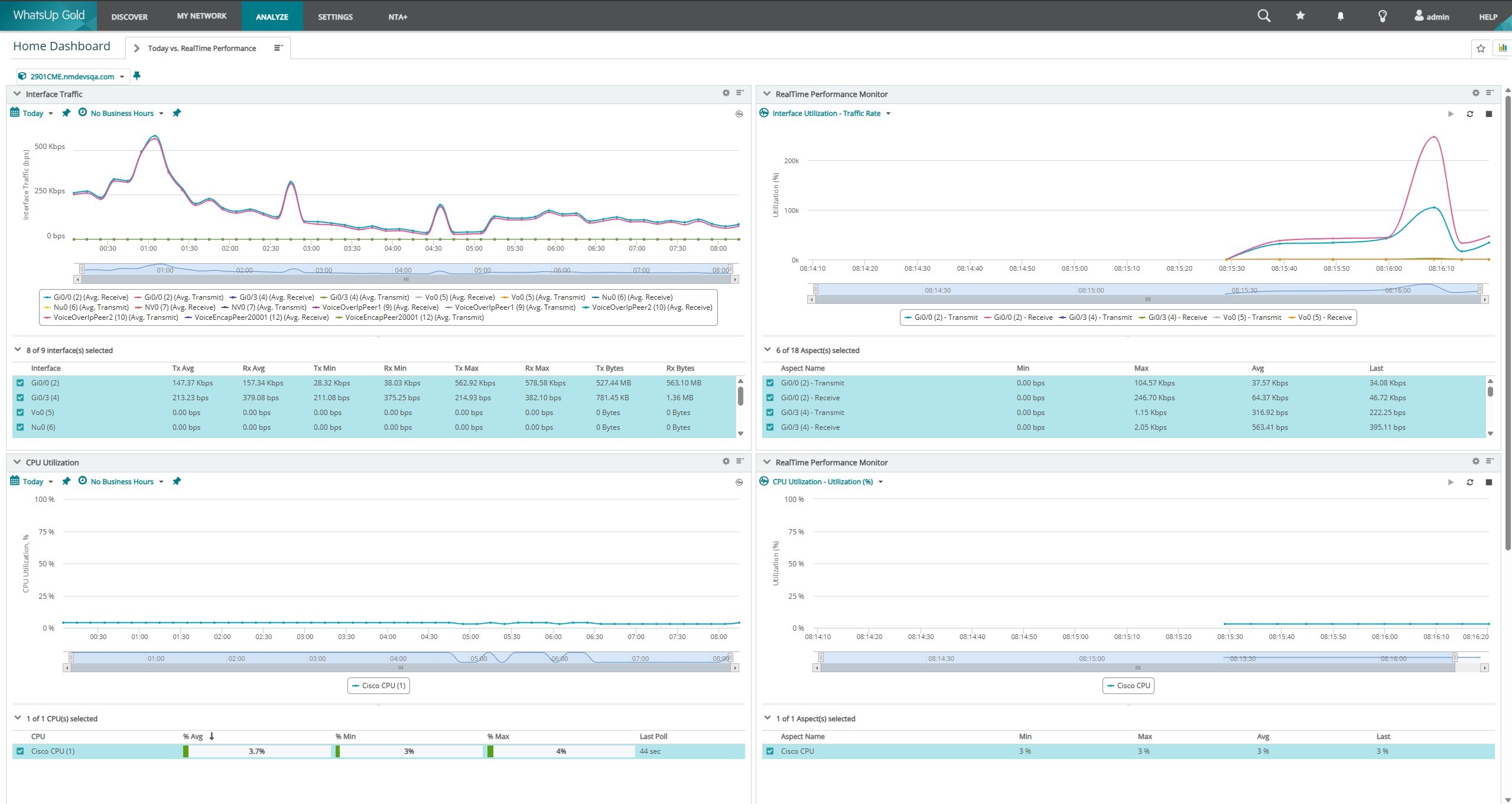
These capabilities enable IT teams to act quickly when something seems off. For example, anomaly detection can identify a sudden surge in traffic from a single device, while historical trends assist you see if the issue is part of a larger pattern.
Monitoring tools also offer visibility into which applications and endpoints are consuming the most bandwidth. This level of detail is critical for diagnosing problems and implementing targeted solutions.
Diagnosing the Issue and Finding the Source
When an alert shows up, start with these steps:
- Determine which IP or device is using the most bandwidth
- Review application usage and verify whether apps are legitimate or unauthorized. Learn how to monitor bandwidth usage
- Correlate the spike with the time of day and user behavior
- Review traffic types and destinations, focusing on suspicious external IPs
Additional Tips
Use traffic analyzers like WhatsUp Gold to monitor network bandwidth. Look for patterns such as daily spikes or recurring anomalies. These insights can help you distinguish between normal fluctuations and real problems.
Mitigation and Response Strategies
When high bandwidth usage is detected, prompt action is critical.
Immediate Steps
Implement Quality of Service (QoS) policies to prioritize critical traffic. Temporarily block non-essential apps or sites. Isolate infected systems to help prevent malware from spreading. These measures can help stabilize performance while you continue to investigate.
Mid and Long-Term Strategies
Establish usage policies and traffic shaping to help avoid future issues. Upgrade infrastructure if you’re consistently hitting capacity. Educate users about bandwidth-heavy activities, such as streaming during work hours. Deploy bandwidth management tools to automate control. Set tiered alert levels so you can respond before issues escalate.
Consider implementing bandwidth limits for non-essential services or scheduling large data transfers during off-peak hours. These tiny adjustments can make a big difference in overall performance.
Building a Proactive Bandwidth Monitoring Culture
Managing bandwidth isn’t just about responding to alerts. It’s about staying ahead. Regular monitoring audits provide visibility across the network and help identify potential problems before they escalate. Automation and AI can offer predictive alerts, reducing the chances of unexpected spikes and outages. Centralized network monitoring tools combine these capabilities together, providing you with a single platform to track usage, analyze trends and respond proactively.
A proactive approach also includes educating employees. When users understand how their actions affect network performance, they’re more likely to follow best practices. Combine this with automated policies and intelligent monitoring, and you’ll create a network environment that is resilient, efficient and secure.
By using these strategies, organizations can maintain optimal performance and avoid costly disruptions.
Ready to take control of your Bandwidth?
WhatsUp Gold network monitoring makes bandwidth monitoring effortless, giving you deep visibility into system metrics, services and performance, all from a single, intuitive dashboard.
Start your free trial today and see how WhatsUp Gold can simplify your infrastructure monitoring.

Greg Collins
Product Marketing Manager | Progress Software Corporation
Greg Collins is the Product Marketing Manager for the Progress WhatsUp Gold. He’s an accomplished marketer with 7+ years in startups, enterprise software, and technical B2B marketing for global organizations.
