
Modern Network Monitoring Needs Visibility Beyond the Edge
Modern IT teams invest heavily in monitoring infrastructure, applications, servers and network devices. Yet when users report that a critical cloud service is slow or a branch office loses connectivity, one question often remains difficult to answer: where is the problem actually occurring?
Is the issue inside your network? Is it your ISP? Has a routing change introduced excessive latency? Did an upstream provider experience an outage?
Traditional monitoring platforms excel at observing what happens inside the network perimeter, but visibility frequently disappears once traffic leaves the LAN. This creates a blind spot that can turn troubleshooting into a lengthy process of collecting evidence, contacting providers and waiting for answers.
To address this challenge, the Progress WhatsUp Gold team is introducing Network Path Health, a capability designed to provide continuous visibility into the network path between your environment and critical external destinations.
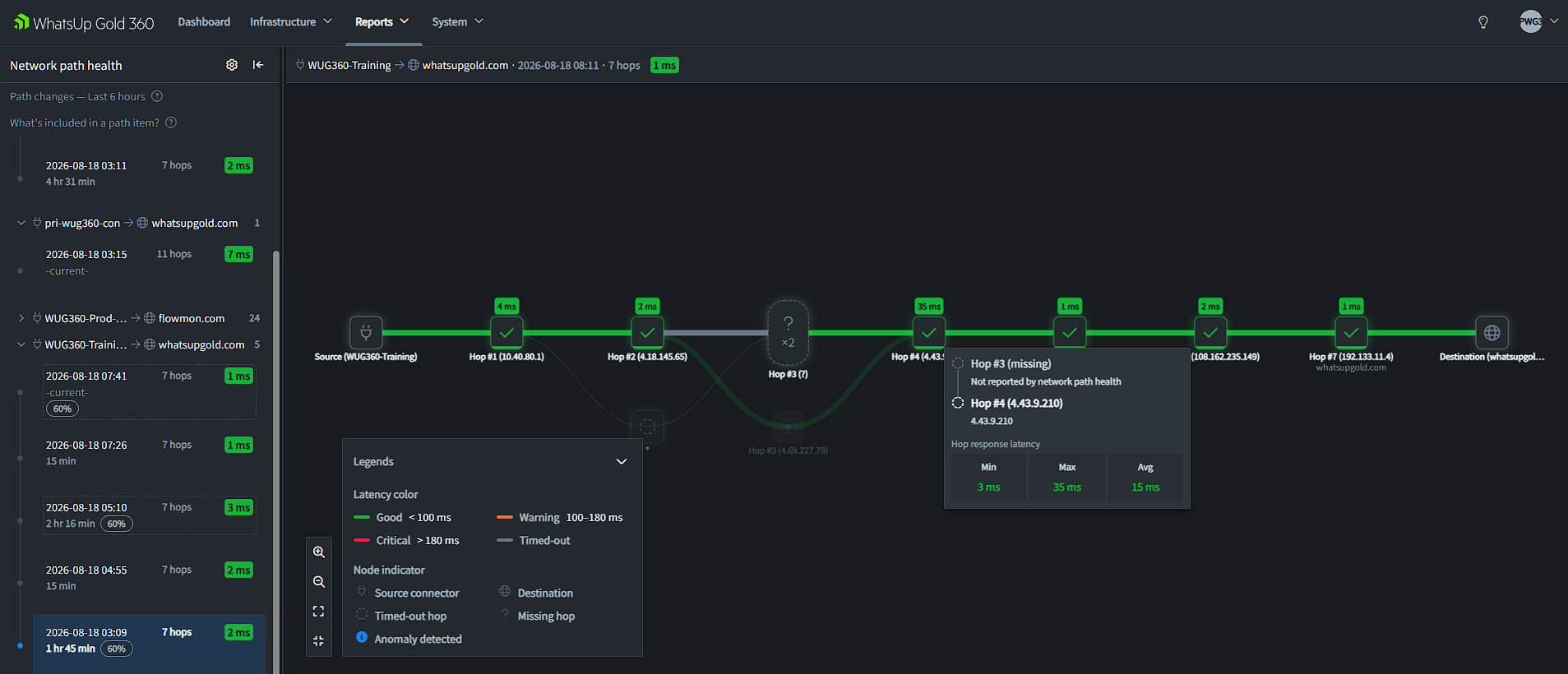
The network path health report visualization in the WhatsUp Gold 360 platform.
The Challenge: Monitoring Stops at the Network Edge
Most monitoring solutions rely on internal collectors, agents or polling engines. When connectivity is disrupted, those monitoring systems may lose visibility precisely when administrators need it most.
Consider a common scenario: users report slow access to SaaS applications, internal devices appear healthy, WAN utilization is normal and the ISP claims its services are operational. The problem may exist somewhere between your site and the destination service, but identifying the exact location often requires manual traceroutes, packet captures and multiple support calls.
Without clear path visibility, troubleshooting becomes time-consuming and reactive.
Introducing Network Path Health
Network Path Health extends WhatsUp Gold monitoring beyond the boundaries of the local network. The planned capability continuously analyzes the route between monitored locations and target destinations, helping teams understand how traffic travels across network paths and where degradation or failure may occur.
Instead of simply knowing that a service is unreachable, administrators can see the path health context behind the issue.
Capabilities at a Glance
Troubleshooting Scenarios
Scenario 1: Microsoft 365 suddenly becomes slow
Situation: At 9:15 AM, the helpdesk starts receiving complaints that Outlook and Teams are responding slowly. Internal applications perform normally and WAN links show no signs of congestion.
How Network Path Health helps: With Network Path Health, administrators can analyze the route from their environment to Microsoft 365 services and identify whether latency has increased at a specific ISP hop or peering connection. Instead of debating whether the issue is internal or external, teams can quickly pinpoint the affected segment and escalate the issue with supporting evidence.
Result: Faster root-cause identification and fewer hours spent troubleshooting healthy infrastructure.
Scenario 2: Intermittent SaaS performance issues
Situation: Users report that a critical SaaS application becomes slow several times per day, but only for a few minutes at a time. Availability monitoring shows that the application is up, while infrastructure metrics appear normal.
How Network Path Health helps: Over several days, Network Path Health can reveal a pattern: route changes occur during peak traffic periods, introducing additional hops and increasing latency. The network team now has concrete evidence showing when the routing changes occur and how they affect user experience.
Result: Intermittent issues become measurable, provable and easier to prioritize.
Scenario 3: The ISP claims everything is fine
Situation: Every network administrator has encountered the familiar response: “Our systems show no issues.” Meanwhile, users continue experiencing degraded performance.
How Network Path Health helps: Network Path Health provides a visual record of the affected route, highlighting latency spikes and unreachable hops. Historical path context can demonstrate exactly when network behavior changed.
Result: Provider escalations become more productive because administrators can supply documented routing evidence.
Scenario 4: Unexpected routing changes after ISP maintenance
Situation: Following a scheduled maintenance event, users begin noticing slower application response times. No devices are down and no links are saturated.
How Network Path Health helps: Network Path Health can show that traffic is now taking a different route through additional upstream providers, adding hops and increasing round-trip latency. Without path monitoring, the route change might have gone unnoticed for weeks.
Result: Teams quickly identify the cause of degraded performance and engage providers before business impact grows.
Visibility Where Traditional Monitoring Ends
Network devices, servers and applications remain critical components of observability, but they represent only part of the user experience. The path between your users and the services they depend on is equally important.
Network Path Health extends the WhatsUp Gold solution beyond traditional infrastructure monitoring by providing continuous visibility into routes that connect the business to cloud applications, remote offices and internet services.
When the next outage occurs, IT teams will not only know that users are impacted. They will know where the problem begins.
Path visibility helps identify where trouble begins; WhatsUp Gold 360 Notification Management addresses how supported alerts reach the right people, channels and schedules.
