When Observability Becomes More Than You Need
Datadog is often a great fit when an organization needs full-stack observability across applications, logs, traces, metrics, and cloud-native services. For engineering and DevOps organizations, that breadth can be powerful.
But infrastructure teams do not always need that level of breadth. Their day-to-day priority is usually more direct: keep networks, servers, virtual environments, WAN links, wireless infrastructure, and critical services available and performing reliably. When that is the primary goal, broad observability can add complexity, cost, and configuration effort that does not always translate into better operations.
That is why a migration from Datadog to Progress WhatsUp Gold should be more than a tool replacement. It is a chance to reset the monitoring strategy: keep what drives action, remove what creates noise, simplify alerting, and rebuild monitoring around practical infrastructure and network visibility.
Why Teams Consider Moving from Datadog to Progress WhatsUp Gold
Cost Predictability
Datadog pricing can depend on hosts, metrics, logs, traces, retention, and additional services. As environments grow, that can make total monitoring cost harder to forecast. Progress WhatsUp Gold uses device-based licensing, giving infrastructure-focused teams a clearer way to plan, budget, and scale monitoring coverage.
Infrastructure-Centric Operations
For many organizations, the most urgent questions are straightforward: What is down? What is slow? Which device, link, or service needs attention? Progress WhatsUp Gold is designed around that operational view, with discovery, device status, topology, performance, alerting, and reporting built around infrastructure operations.
Simplified Administration
Over time, broad observability environments can become difficult to manage. Dashboards multiply, integrations expand, queries become harder to maintain, and alert rules accumulate. Progress WhatsUp Gold takes a more focused approach with automated discovery, reusable credentials, device templates, topology maps, dashboards, reports, and centralized alert workflows that are easier to manage day to day.
On-Premises Deployment Requirements
Some organizations also need local control over monitoring systems and operational data. Progress WhatsUp Gold supports on-premises deployment while still helping teams monitor hybrid environments that include physical infrastructure, virtual platforms, and selected cloud resources.
Pre-Migration Assessment
Start with a structured review of the current Datadog environment. The goal is not to recreate every Datadog object exactly as it exists today. Instead, identify the monitoring that supports real operational decisions, remove unused or noisy elements, and define a cleaner monitoring model for WhatsUp Gold.
Key takeaway: If a monitor, dashboard, or alert cannot be tied to a real operational decision, it should not automatically move into the new platform.
With the assessment complete, migration becomes easier to plan. A successful project usually follows six practical stages: inventory, translation, foundation setup, alert redesign, dashboard rebuild, and validation.
Step 1: Inventory Existing Monitoring Coverage
Create a clear inventory of monitored assets, integrations, dashboards, alert rules, notification workflows, and any custom logic currently used in Datadog. This becomes the migration roadmap and helps show what to recreate, redesign, consolidate, or retire.
- Infrastructure hosts
- Network devices
- Virtual environments
- Cloud resources
- Storage systems
- Business-critical applications
Step 2: Translate Datadog Concepts into Progress WhatsUp Gold
Datadog and WhatsUp Gold use different operating models, so avoid a one-for-one copy of the old configuration. Instead, translate the operational intent behind each monitor, dashboard, and alert. Then map each requirement to the most appropriate WhatsUp Gold capability.
Step 3: Build the Progress WhatsUp Gold Foundation
Before rebuilding monitors and dashboards, make sure the WhatsUp Gold foundation is ready. Validate deployment sizing, SQL connectivity, credentials, discovery scopes, user access, and core system settings first. A clean foundation helps avoid rework later in the migration.
- SNMP credentials
- WMI credentials
- SSH credentials
- VMware credentials
- Cloud integrations where applicable
- Discovery scopes and IP ranges
- User roles and permissions
- Polling and retention requirements
Step 4: Rebuild Alerts and Notifications
Alerting is one of the best places to reduce noise. Recreate alerts based on operational value, not historical volume. Separate availability alerts from performance threshold alerts, review escalation paths, and remove notifications that no longer drive action.
- Availability alerts, such as device down, service unavailable, and interface down
- Performance alerts, such as CPU, memory, interface bandwidth, and disk usage
- Traffic and security-related alerts where those capabilities are licensed and deployed
- Escalation timing and recipients
- Maintenance windows and planned downtime handling
- Integration with ticketing or collaboration tools where required
Step 5: Recreate Dashboards and Reporting
Dashboards should help people act, not just display data. Rebuild only the dashboards and reports that operations teams actively use, with a focus on daily operations, outage response, executive reporting, capacity planning, and service availability.
- NOC operations
- Infrastructure health
- Executive reporting
- Capacity planning
- Service availability
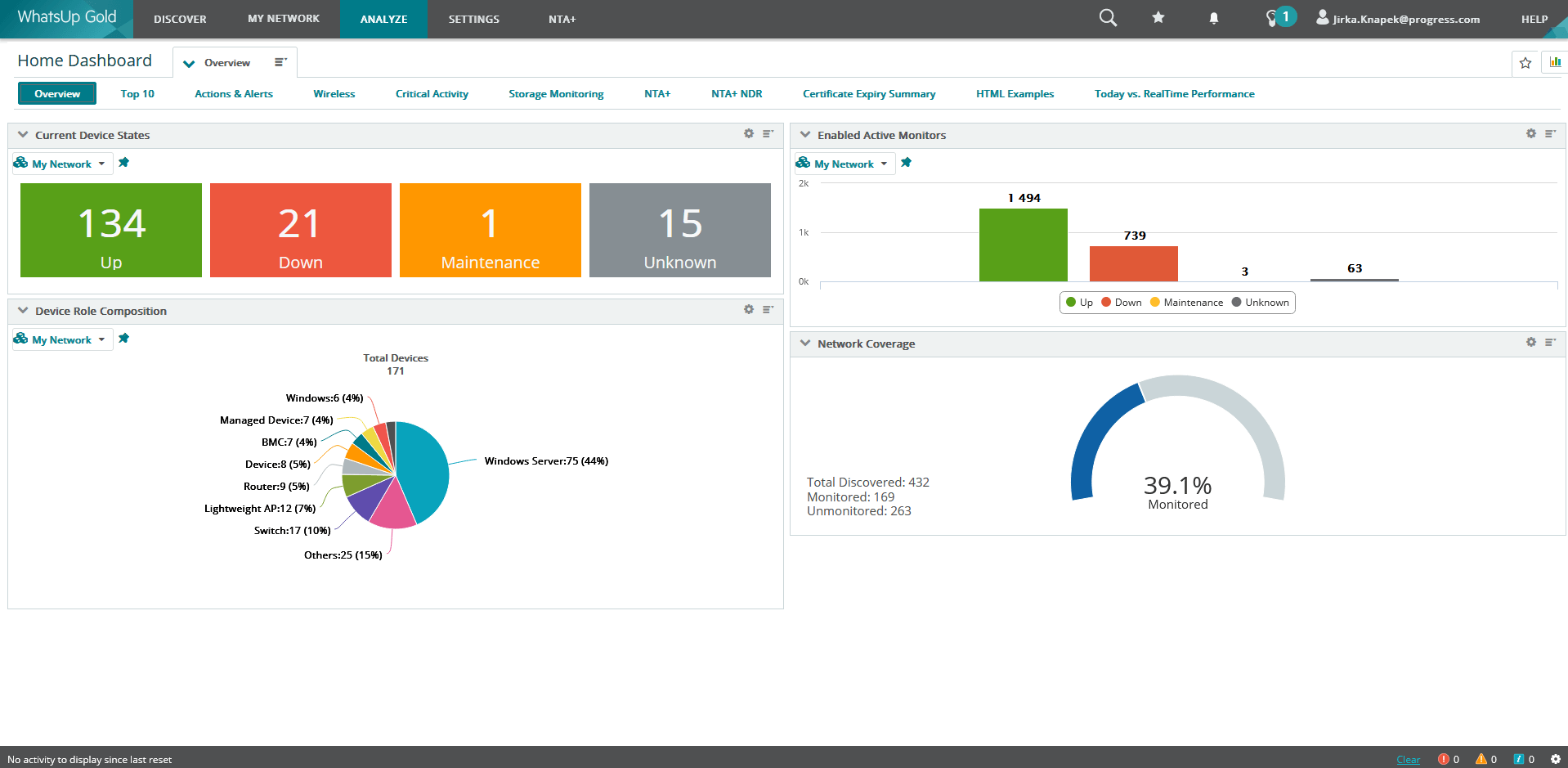 WhatsUp Gold Dashboard
Step 6: Validate Monitoring Coverage and Cut Over
Before retiring Datadog workflows, run Datadog and WhatsUp Gold in parallel. Compare monitoring coverage, alert behavior, dashboard usefulness, and reporting output so stakeholders can validate the new environment with confidence.
- Critical devices are discovered and classified correctly
- Required availability checks are functioning
- Performance thresholds are aligned with operational expectations
- Alert notifications reach the right teams
- Dashboards support real troubleshooting workflows
- Reports provide the required business and operational insight
- Operations stakeholders approve the cutover plan
Why Infrastructure Teams Choose Progress WhatsUp Gold
Faster Time to Value
Automated discovery, device roles, built-in monitors, and dashboards help teams move from deployment to useful monitoring coverage quickly.
Simplified Licensing
Device-based licensing gives teams a clearer way to forecast monitoring growth than telemetry-heavy pricing models.
Better Network Visibility
Topology mapping, device context, and performance visibility help teams understand dependencies and troubleshoot infrastructure issues faster.
Unified Infrastructure Operations
Infrastructure monitoring, Network Traffic Analysis Plus (NTA+), configuration visibility, and Network Detection and Response (NDR) capabilities can be combined in one operational platform, depending on licensing and deployment requirements.
Reduced Administrative Overhead
A focused monitoring model reduces the time teams spend maintaining dashboards, custom queries, and low-value alerts.
Conclusion
Migrating from Datadog to Progress WhatsUp Gold is a chance to make monitoring simpler, more predictable, and more useful for the teams who depend on it every day.
The strongest migrations do not move every object from the old platform into the new one. They preserve monitoring that supports real decisions, remove noise, validate coverage through a parallel run, and cut over only when operations teams are confident in the new workflows.
If your team is responsible for network and infrastructure availability, WhatsUp Gold can help shift monitoring from broad observability to focused, actionable operational visibility.
Start a free Progress WhatsUp Gold trial and compare it against the monitoring workflows your team depends on today.
