
Compare WhatsUp Gold With Other IT Tools
Compare Progress® WhatsUp® Gold software with established network monitoring and observability tools. These guides are for IT leaders and network administrators evaluating workflow fit, relevant plans, operational limits, and the practical work involved in switching platforms.
Evaluate Your Network Monitoring Options
Select your current tool or another product on your shortlist. Each guide focuses on a different buying decision, so start with the comparison closest to your environment and operating model.
Network monitoring and platform consolidation
WhatsUp Gold vs SolarWinds NPM
Evaluate whether you need a consolidated network-monitoring workflow or the breadth of a modular monitoring portfolio, including the effect of add-ons, deployment design and licensing.
WhatsUp Gold vs SolarWinds NPM
Network discovery, licensing and scale
WhatsUp Gold vs PRTG Network Monitor
Compare device-based and sensor-based licensing alongside discovery, topology mapping, alert tuning and the administrative effort required as the monitored environment grows.
WhatsUp Gold vs SolarWinds NPM
Unified infrastructure monitoring
WhatsUp Gold vs ManageEngine OpManager
Assess unified monitoring against a broader module-based ecosystem, with attention to user licensing, traffic analysis, dashboard setup and ongoing management for a lean IT team.
WhatsUp Gold vs SolarWinds NPM
Network operations vs cloud observability
WhatsUp Gold vs Datadog SaaS Monitoring
Decide between network-focused infrastructure monitoring and a cloud-oriented observability platform by examining deployment, agent requirements, integrations, dashboard work and variable usage.
WhatsUp Gold vs SolarWinds NPM

Integrated workflows and customization
WhatsUp Gold vs Nagios XI
Explore how an integrated workflow for discovery, topology, interfaces, wireless, flow and reporting compares with a highly customizable monitoring approach that may use separate products or extensions.
WhatsUp Gold vs SolarWinds NPM
Start with What Matters to Your Team
A useful shortlist begins with the work your team must complete. Use these priorities to choose the most relevant comparison, then verify the required edition, deployment model and integrations on the product pages.

Predictable Cost
Model the required device, sensor, host, user and data volumes over the expected term. Include add-ons, support, database infrastructure and administrator time.

Everyday Network Operations
Test discovery, topology, alert triage, reporting and configuration changes with the staff who will use them during an incident.

Cloud and Application Observability
Determine whether the primary requirement is network and infrastructure health or telemetry across cloud services, applications and developer workflows.

Deployment and Control
Confirm where monitoring data, pollers, agents and databases will run. Include security, remote-site connectivity, maintenance and data-retention requirements.
What Each Comparison Evaluates
| Criterion | What the Linked Comparisons Clarify |
|---|---|
| Workflow Fit | Whether the required task can be completed and where manual steps remain |
| Cost Formula | Required plan, seats or usage, add-ons, infrastructure and setup details. |
| Adoption | Setup needs, training and the daily user experience |
| Integrations | Whether a connection supports the required workflow and data direction |
| Switching and Control | Transfer coverage, export options and deployment constraints |
Where WhatsUp Gold Fits Best

Built in Network Detection and Response
The WhatsUp Gold Network Detection and Response (NDR) solution is designed for IT operations teams that need direct visibility into the availability and performance of network devices, servers, virtual machines, cloud resources and wireless environments from a network-centered view.

Topology-Aware Network Visibility
Support faster investigation when an interface, upstream device or service dependency affects multiple alerts through automated discovery and interface maps that provide context for devices and dependencies. The value is highest when the discovery scope and credentials are maintained as the environment changes.

Integrated Operational Workflows
Monitoring, alerting, reporting and network traffic analysis can be brought into a common operational workflow, subject to the selected edition and configuration. Teams should confirm the exact capabilities included in the plan they evaluate rather than comparing product names alone.

Deployment Choices for Infrastructure Teams
The WhatsUp Gold platform supports on-premises and hybrid monitoring patterns. This can suit organizations that want direct control over the monitoring server and database, provided they are prepared to size, secure, patch and back up that infrastructure.
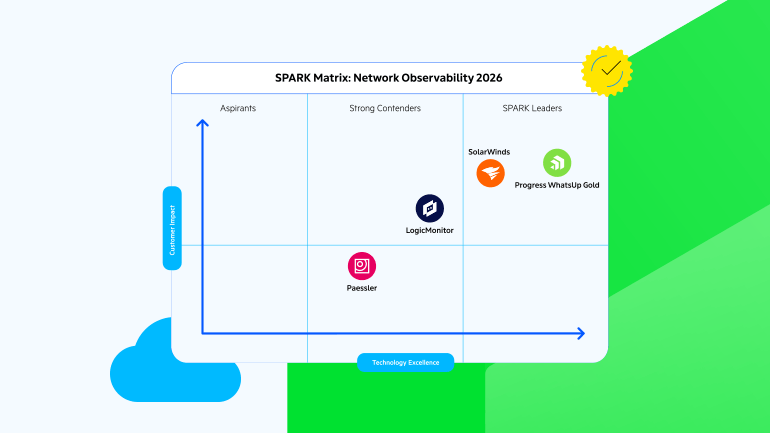
SPARK Matrix™ Network Observability Report 2026
Learn More
WhatsUp Gold Named a Leader in Report for Network Management
Learn More






WhatsUp Gold Earns High Marks in Latest G2 Report
WhatsUp Gold has been recognized as an industry leading network monitoring tool in the recent G2 Grid Report for network monitoring solutions winning 17 total awards overall.
How to Migrate to WhatsUp Gold
Treat migration as an opportunity to streamline monitoring. Focus on preserving critical visibility, alerts, and workflows while removing outdated devices and unnecessary noise.
Key Steps
- Inventory devices, credentials, reports, alerts, and workflows.
- Export existing configurations and historical data.
- Discover and validate devices in WhatsUp Gold.
- Recreate essential monitors, dashboards, and notifications.
- Run both platforms in parallel to verify coverage and tune alerts.
Note: Migration support varies by platform. Where automated migration tools are unavailable, plan for manual recreation of monitoring configurations and workflows.
Validate Before You Commit
Before making the switch, try out WhatsUp Gold in your IT environment. Verify the discovery, alerts, reporting, user access, and backups meet your requirements.
Download the free WhatsUp Gold trial

Comparisons’ Basis and Limits
These pages are published by the WhatsUp Gold team and should be read as vendor comparisons. Product capabilities, editions and cost mentions should be checked against official documentation and the commercial terms supplied for the intended deployment.
The comparison sets apply almost the same criteria to every product - workflow fit, adoption, integrations, witching and deployment control. Vendor documentation and pricing pages can establish documented capabilities and terms. Customer evidence and hands-on testing, when available, should be identified separately. Plan-dependent differences name the relevant edition.
FAQs
How Should I Compare Pricing Fairly?
Compare the editions that support your required workflow at the expected scale. Model device, sensor, host, user and data volumes, then add optional modules, support, database infrastructure, implementation and administration. Use the same contract term and tax basis for every option. Published starting prices rarely represent the full operating cost.
Can I Test WhatsUp Gold Before Moving My Team?
Yes. The WhatsUp Gold website offers a free, fully functional trial. Confirm the current system requirements and trial terms on the download page, then use the pilot to test discovery, alerts, reports and a critical integration. Download the free trial
How Easy Is It to Migrate to WhatsUp Gold?
The effort depends on device count, custom monitors, historical-data requirements, integrations and alert complexity. Discovery can rebuild the device inventory, while policies, dashboards and specialized checks may need the help of the WhatsUp Gold team. A scoped parallel run reduces risk and reveals coverage gaps before the previous platform is retired.
Get Started
Complete the form to download your free trial of WhatsUp Gold.
Click here for latest system requirements.