
Migrating from PRTG to WhatsUp Gold can feel daunting, but with the right approach, it’s a smooth transition that unlocks powerful monitoring capabilities and a simplified user experience. WhatsUp Gold offers intuitive dashboards, flexible licensing, and advanced features like Network Traffic Analysis, Application Monitoring, and integrated Network Detection & Response (NDR) for comprehensive visibility across hybrid environments.
In this guide, we’ll walk through the five essential steps to ensure a successful migration and explain why IT teams are making the switch.
Pre-Migration Checklist
Before you start:
- Validate WhatsUp Gold system requirements (OS, SQL Server).
- Confirm licensing needs (Enterprise Plus recommended for full feature set).
- Backup your PRTG configuration.
- Gather all credentials (SNMP, WMI, API).
- Identify critical devices and services.
Step 1: Inventory Your Credentials
Start by gathering all the credentials used in PRTG for device access: SNMP, WMI, API credentials. This ensures seamless discovery and monitoring in WhatsUp Gold.
WhatsUp Gold Advantage:
- Centralized Credential Library for secure storage and easy updates.
- Credentials automatically applied during discovery scans.
In PRTG, credentials are inherited from groups and can be overridden if needed. In WhatsUp Gold, each device uses its own specific credentials for each credential type. Once you have gathered all your credentials from PRTG and unraveling any inheritance woes, you simply add each one to WhatsUp Gold’s credential library. Credentials in WhatsUp Gold can then be used during discovery scans and the appropriate credentials are automatically assigned with the appropriate devices. By providing credentials at the time of discovery, WhatsUp Gold can identify the device and associate the appropriate monitors.
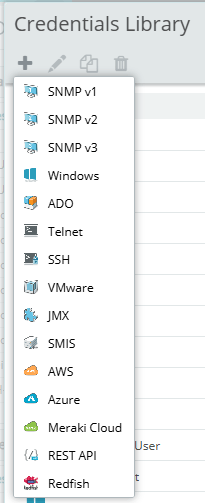
Tip: Add all your credentials to WhatsUp Gold Credential Library before running your first discovery scan.
Step 2: Discover & Monitor Your IP Addresses
Use WhatsUp Gold’s Layer 2/Layer 3 Discovery to automatically scan your network and create & maintain maps of your environment. Each device group in WhatsUp Gold has its own automatic & custom map associated with it, and devices can be members of as many groups as you’d like without license implications. This feature provides a visual topology map, making it easier to validate coverage and identify gaps compared to PRTG’s sensor-based approach.
Why WhatsUp Gold beats PRTG here:
- Monitored devices can belong to multiple device groups without license impact.
- Each device group includes both an automated and custom topology map view for validation, gap analysis, and dashboards
Options for migration
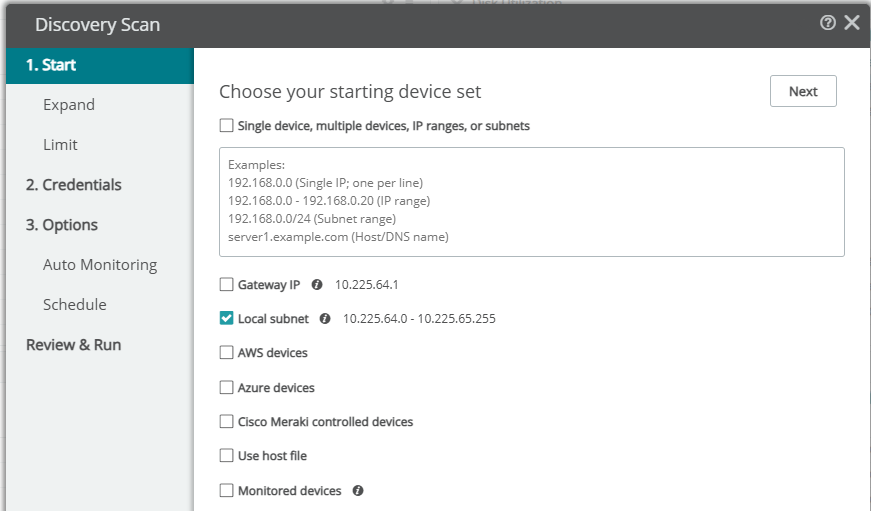
- Manual/UI: Export IPs from PRTG (if possible) and paste into WhatsUp Gold’s “New Discovery Scan.”
- API/Scripting: Use the WhatsUpGoldPS PowerShell module for automation.
Manual/UI approach
Review your auto-discovery groups and copy any information for usage later. You may also choose to export from the PRTG UI, if you can figure out how, I struggled with it in my environment. These addresses & hostnames can be pasted in WhatsUp Gold’s “New Discovery Scan”
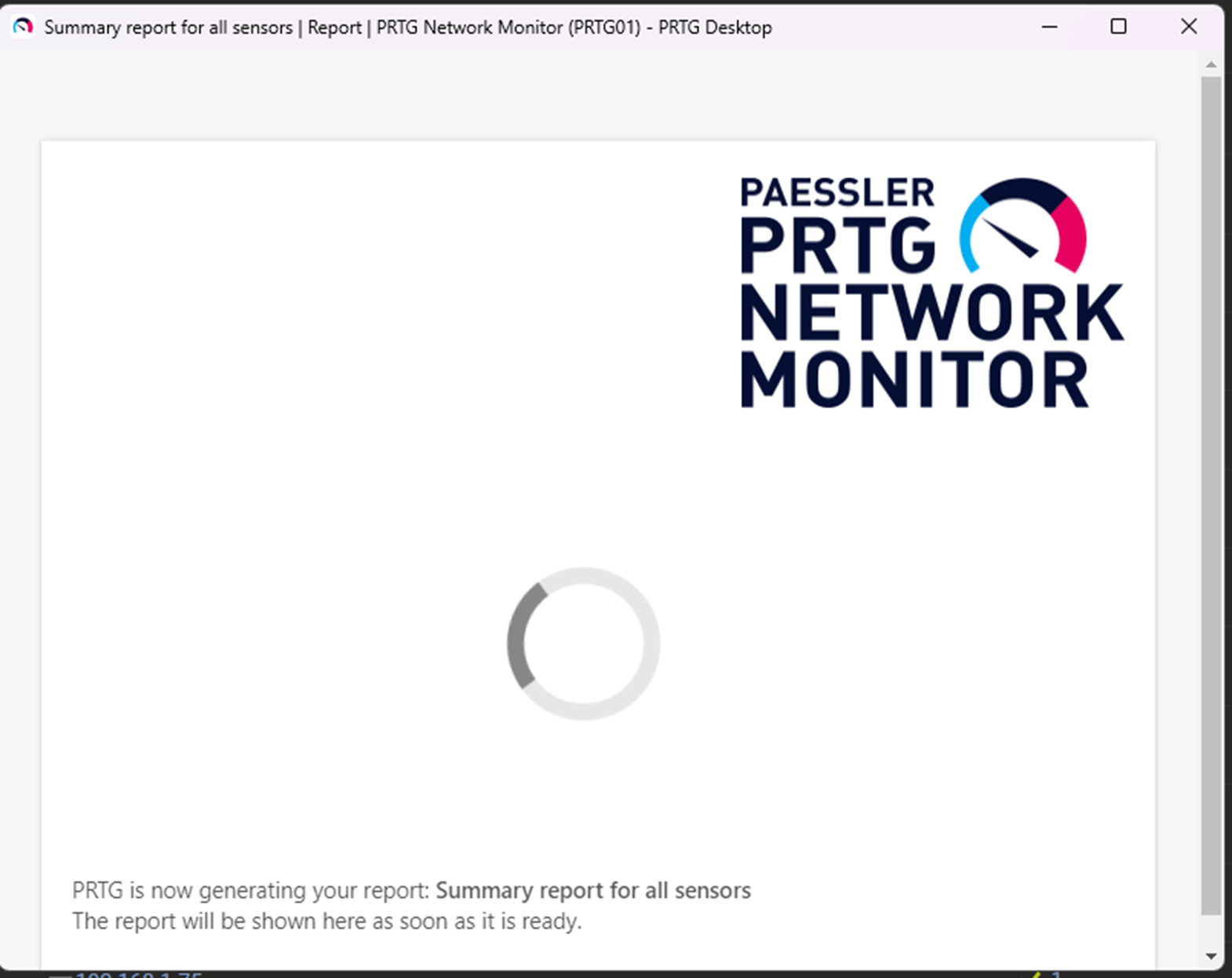
If your environment is small enough, you may choose to export your IP addresses & hostnames from PRTG’s UI (if you can!) I was unable to do so since I had >1,000 records and the report just hung forever for me. None of the export options worked for me and the one present directly in the UI, XML, wasn’t ideal.
API/Scripting approach
I didn’t want to copy/paste via the PRTG UI, as I found it messy. I discovered there was an unofficial PRTG PowerShell module for working with the PRTG API. I used the WhatsUp Gold PowerShell module, WhatsUpGoldPS, to populate the list of IP addresses & pass it over to my WhatsUp Gold server simply by running a command 😊
# ---- Config ----
$PrtgServer = '192.168.74.104'
$WugServer  = '192.168.74.74'
$WugProtocol = 'https'
$IgnoreSslErrors = $true  # set $false if you want strict SSL

# ---- Install modules if required & import them
try {
    if (-not (Get-Module -ListAvailable -Name 'PrtgAPI')) {Install-Module PrtgAPI -Scope CurrentUser -Force -AllowClobber}
    Import-Module PrtgAPI -ErrorAction Stop
    if (-not (Get-Module -ListAvailable -Name 'WhatsUpGoldPS')) {Install-Module WhatsUpGoldPS -Scope CurrentUser -Force -AllowClobber}
    Import-Module WhatsUpGoldPS -ErrorAction Stop
}
catch {
    throw "Module install/import failed: $($_.Exception.Message)"
}

# ---- Credentials ----
if (-not $PRTGCred) { $PRTGCred = Get-Credential -Message "Enter PRTG username and password" }
if (-not $WUGCred)  { $WUGCred  = Get-Credential -Message "Enter WhatsUp Gold username and password" }

# ---- Connect to PRTG and collect IPs/Hostnames ----
try {
    if ($IgnoreSslErrors) {
        Connect-PrtgServer -Server $PrtgServer -Credential $PRTGCred -IgnoreSSL -Force | Out-Null
    } else {
        Connect-PrtgServer -Server $PrtgServer -Credential $PRTGCred -Force | Out-Null
    }

    $devices = Get-Device
    if (-not $devices) { throw "No devices returned from PRTG." }

    $ipList = $devices |
        Where-Object { $_.Host -and $_.Host.Trim() } |
        ForEach-Object { $_.Host.Trim() } |
        Sort-Object -Unique

    if (-not $ipList -or $ipList.Count -eq 0) { throw "No usable Host values found on PRTG devices." }
}
catch {
    throw "PRTG step failed: $($_.Exception.Message)"
}

# ---- Connect to WhatsUp Gold and add devices ----
try {
    if ($IgnoreSslErrors) {
        Connect-WUGServer -serverUri $WugServer -Protocol $WugProtocol -IgnoreSSLErrors -Credential $WUGCred | Out-Null
    } else {
        Connect-WUGServer -serverUri $WugServer -Protocol $WugProtocol -Credential $WUGCred | Out-Null
    }

    Add-WUGDevice -IpOrName $ipList
    Write-Host "Added/submitted $($ipList.Count) targets to WhatsUp Gold."
}
catch {
    throw "WUG step failed: $($_.Exception.Message)"
}
Step 3: Translate Alerts and Actions
PRTG’s notifications and actions need to be recreated in WhatsUp Gold.
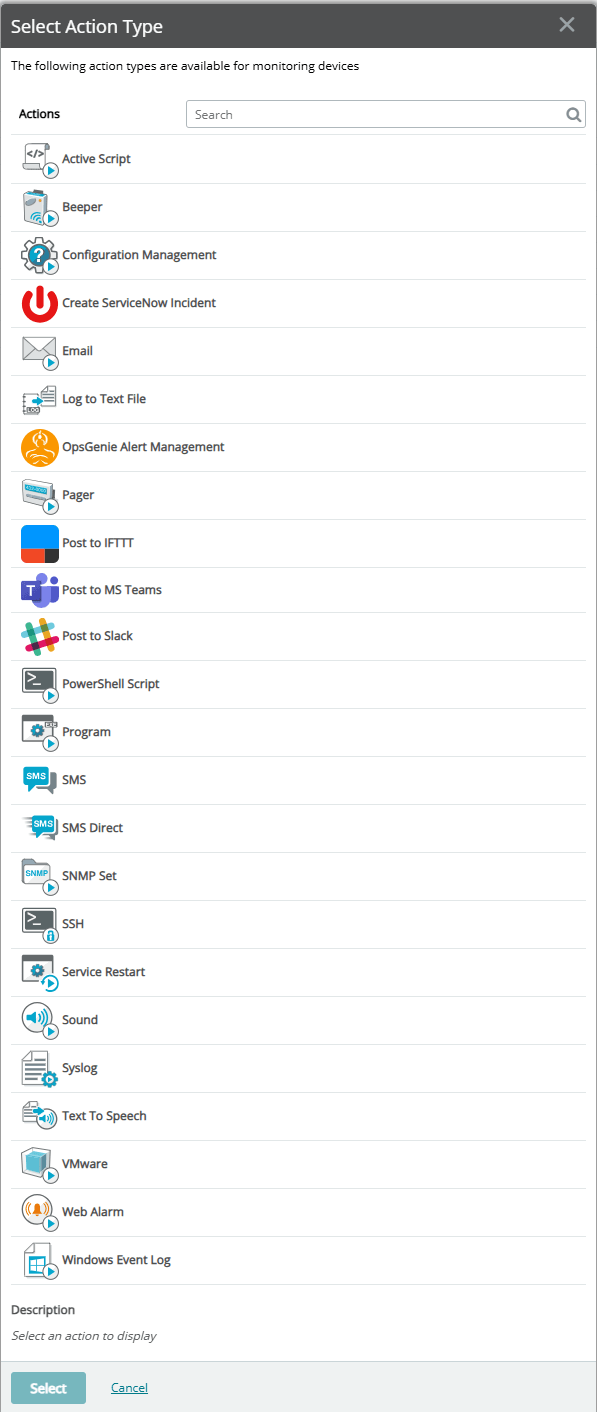
- Map PRTG sensor notification triggers to WhatsUp Gold’s Action Policies (availability) & Alert Center (performance) Notifications.
- Configure escalation paths and multi-channel notifications (email, SMS, Teams, Slack).
- Leverage the deep Action Library for automated remediation tasks such as SSH, PowerShell, Program, and Script action types.
Step 4: Recreate Reporting and Dashboards
WhatsUp Gold offers out-of-the-box dashboards that are completely customizable. By offering per user dashboard views, WhatsUp Gold enables IT teams to focus on the infrastructure problems that require the most immediate attention. Each report within WhatsUp Gold, including dashboards, can be easily exported to various file formats, as well as scheduled to be sent from the modern and more secure authorization framework, OAuth 2.0.
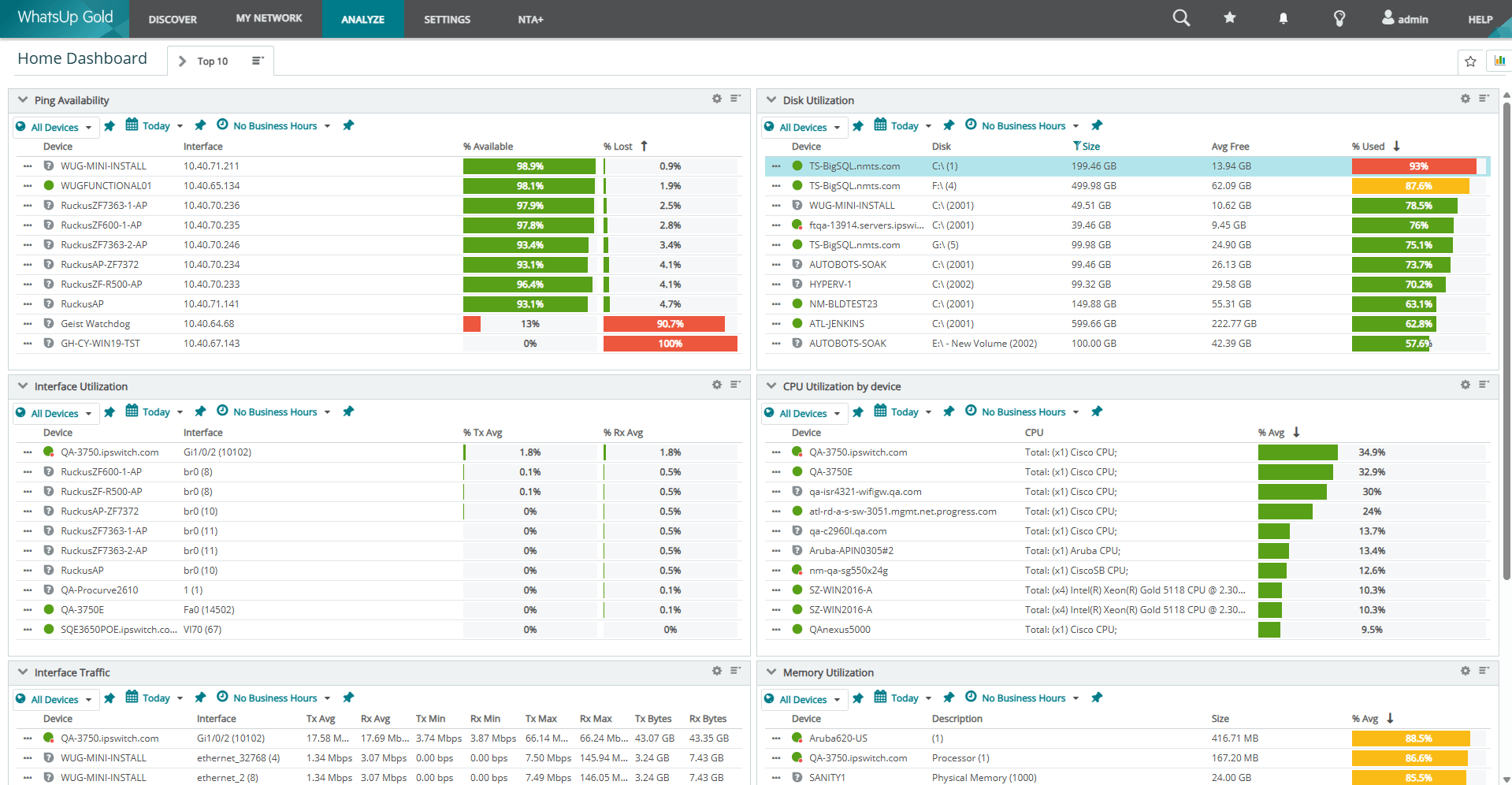
- Rebuild key PRTG ‘magic maps’ using WhatsUp Gold’s Dashboards, Device Group Map Views, & out-of-the-box full page reports available instantly
- Create role‑based dashboards and NOC Viewer slide decks so NOC teams, admins, and executives can easily see how well your network is performing.
Use WhatsUp Gold’s scheduled report export capabilities for compliance, audit, and daily/weekly update needs.
Step 5: Validate Monitoring Coverage
Perform a gap analysis to confirm that all critical devices and services are monitored.
- Compare WhatsUp Gold’s device-based licensing to PRTG’s sensor model for cost efficiency. In my lab environment, I had roughly 1,000 sensors, when scanned with WhatsUp Gold this equated to 70 devices – only 26 of which with valid credentials I cared about monitoring. WhatsUp Gold’s discovery enables you to ensure that you’re consuming a license only when required. With these 26 devices, I can monitor thousands of aspects/channels if I choose, as the licensing allows me to do so.
- Validate that you’re monitoring anything critical to your organization’s business and operations. Use WhatsUp Gold’s Monitor Library to recreate any missing sensors such as Windows Service monitors, Windows or Linux process monitors, SSL Certificate Monitors, HTTPS Content Monitors, WMI monitors, SNMP Table Monitors, and investigate WhatsUp Gold’s vast out-of-the-box monitor library.
PRTG to WhatsUp Gold Terminology Translation Table
PRTG vs WhatsUp Gold
Why Teams Are Switching
- Simplified Licensing: WhatsUp Gold uses device-based licensing, avoiding the complexity of sensor counts.
- Unified Platform: Combines Network Performance Monitoring, Application Monitoring, and NDR in one solution.
- Ease of Use: Intuitive, lightning-fast UI and quicker deployment compared to PRTG’s configuration-heavy setup.
- Poor reporting experience: You shouldn’t have to wait to report on your network. How can you show your boss how good your network is when you can’t show them a report instantly?
- Scalability: Enterprise Plus edition supports large, distributed environments without additional costs and less administration overhead.
What IT Pros Say About PRTG vs WhatsUp Gold
- PRTG Pain Points: Sensor-based licensing complexity, slow reporting, UI frustrations.
- WhatsUp Gold Strengths: Faster deployment, intuitive dashboards, cost-effective licensing, integrated security features.
Considering other tools? Here’s why WhatsUp Gold stands out
Are you considering other tools like SolarWinds, Nagios, Zabbix, NetCrunch?
WhatsUp Gold offers:
- Simpler migration paths with automated discovery and credential management.
- Unified platform for network, application, and security monitoring.
- Device-based licensing for predictable costs.
Licensing Overview
The WhatsUp Gold licensing structure is designed to make it easy for customers to choose the solution that best fits their requirements. WhatsUp Gold offers Subscription or Perpetual licenses:
WhatsUp Gold Subscription:
- Business: Ideal for small to medium-sized businesses with a growing IT infrastructure. All standard network monitoring capabilities are included as well as 10/5 email support.
- Enterprise: For enterprises with complex IT infrastructure needing advanced network monitoring. Includes all features from the Business tier, the ability to monitor up to 50k devices, Log Management, Internet Connection Monitoring, Application and Virtualization Monitoring, up to 2 installations of the WhatsUp Gold solution, as well as 24/5 phone and email support.
- Enterprise Plus: For large organisations needing a powerful and adaptable monitoring solution with advanced capabilities. Includes all features from the Enterprise tier, the ability to monitor up to 100k devices, Network Traffic Analysis Plus (NTA+), Configuration Management and up to 4 installations of WhatsUp Gold.
WhatsUp Gold Perpetual:
- Premium: Ideal for small to medium-sized businesses with a growing IT infrastructure. It comes with the core functionality with the ability to include the following add-ons: Network Traffic Analysis, Application Performance Monitoring, Virtual Monitoring, Configuration Management and Log Management.
- Total Plus: For organisations needing a powerful and adaptable monitoring solution with advanced capabilities. WhatsUp Gold Total Plus is an all-in-one package. It includes all WhatsUp Gold Premium and all the add ons.
Why Enterprise Plus for Migration?
- Simplifies licensing (no add-on complexity).
- Includes advanced features like NTA+, Configuration Management, and NDR
- Scales easily for distributed, highly available environments.
FAQs
Does WhatsUp Gold support hybrid environments?
Yes, it provides visibility across on-premises, cloud, and distributed networks.
How does device-based licensing work?
You pay per device, not per sensor. For example, you can monitor thousands of metrics per device without extra cost.
Can I integrate with ticketing systems?
Yes, WhatsUp Gold supports third-party ticketing integrations.
Is there a free evaluation or free edition?
Yes, you can start with WhatsUp Gold Enterprise Plus evaluation (up to 2000 devices) or Free Edition (up to 10 devices).
Does WhatsUp Gold offer mobile access?
Yes, via WhatsUp Gold 360 cloud portal (browser-based). Enterprise and Enterprise Plus subscriptions include WhatsUp Gold 360 access.
Final Thoughts
Migrating from PRTG to WhatsUp Gold is an opportunity to modernize your monitoring strategy. By following these steps, you’ll gain better visibility, streamlined workflows, and a platform designed for today’s hybrid IT environments.
Start a conversation with our experts or begin your free trial.

Jason Alberino
Explore expert insights from Jason Alberino on network monitoring, security, and IT best practices. Stay ahead with his latest posts.
